Indexer Pipeline Architecture
The sui-indexer-alt-framework provides two distinct pipeline architectures. Understanding their differences is crucial for choosing the right approach.
Sequential versus concurrent pipelines
Sequential pipelines commit complete checkpoints in order. Each checkpoint is fully committed before the next one, ensuring straightforward, consistent reads.
Concurrent pipelines commit out-of-order and can commit individual checkpoints partially. This allows you to process multiple checkpoints simultaneously for higher throughput, but requires reads to check which data is fully committed to ensure consistency.
When to use each pipeline
Both pipeline types can handle updates in place, aggregations, and complex business logic. While sequential pipelines have throughput limitations compared to concurrent, the decision to use one over the other is primarily about engineering complexity rather than performance needs.
Recommended: Sequential pipeline
Start here for most use cases. Provides more straightforward implementation and maintenance.
- ✓ You want straightforward implementation with direct commits and basic queries.
- ✓ Team prefers predictable, easy-to-debug behavior.
- ✓ Current performance meets your requirements.
- ✓ Operational simplicity is valued.
Concurrent pipeline
Consider implementing a concurrent pipeline when:
- ✓ You need performance optimization.
- ✓ Sequential processing does not keep up with your data volume.
- ✓ Your team is willing to handle the additional implementation complexity for the performance benefits.
Supporting out-of-order commits introduces a few additional complexities to your pipeline:
- Watermark-aware queries: All reads must check which data the pipeline fully committed. See the watermark system section for details.
- Complex application logic: You must commit data in pieces rather than handle complete checkpoints.
Decision framework
If you are unsure of which pipeline to choose for your project, start with a sequential pipeline as it is easier to implement and debug. Then, measure performance under a realistic load. If the sequential pipeline cannot meet your project's requirements, then switch to a concurrent pipeline.
While not an exhaustive list, some specific scenarios where a sequential pipeline might not meet requirements include:
- Your pipeline produces data in each checkpoint that benefits from chunking and out-of-order commits. Individual checkpoints can produce lots of data or individual writes that might add latency.
- You are producing a lot of data that needs pruning. In this case, you must use a concurrent pipeline.
Beyond the decision of which pipeline to use, you also need to consider scaling. If you are indexing multiple kinds of data, then consider using multiple pipelines and watermarks.
Common pipeline components
Both sequential and concurrent pipelines share common components and concepts. Understanding these shared elements helps clarify how the two architectures differ.
Processor component
The Processor is the concurrent processing engine, handling multiple tasks running at the same time for maximum throughput. Its primary responsibility is to convert raw checkpoint data into database-ready rows using parallel workers.
The component handles this task by spawning FANOUT worker tasks (default: 10) for parallel processing. The FANOUT is the key configuration as it controls parallel processing capacity.
Variable not found. If code is formatted correctly, consider using code comments instead.
Each worker calls your Handler::process() method independently.
Variable not found. If code is formatted correctly, consider using code comments instead.
Each of these workers can process different checkpoints simultaneously and in any order. The workers send their processed data to the Collector with checkpoint metadata.
The Processor component works identically in both sequential and concurrent pipelines. It receives checkpoint data from the Broadcaster, transforms it using your custom logic, and forwards the processed results to the next stage in the pipeline.
Watermark concepts summary
Before diving into pipeline-specific architectures, understand the three types of watermarks used for coordination:
| Watermark | Purpose | Pipeline type |
|---|---|---|
checkpoint_hi_inclusive | Highest checkpoint where all data is committed (no gaps) | Both pipelines for recovery and progress tracking |
reader_lo | Lowest checkpoint guaranteed to be available for queries | Concurrent pipelines with pruning enabled |
pruner_hi | Highest checkpoint that has been pruned (deleted) | Concurrent pipelines with pruning enabled |
These watermarks work together to enable safe out-of-order processing, automatic data cleanup, and recovery from failures.
The watermark system
For each pipeline, the indexer tracks at minimum the highest checkpoint where all data up to that point is committed. The indexer tracks this through the checkpoint_hi_inclusive committer watermark. Both concurrent and sequential pipelines rely on checkpoint_hi_inclusive to understand where to resume processing on restarts.
Optionally, the pipeline tracks reader_lo and pruner_hi, which define safe lower bounds for reading and pruning operations, if pruning is enabled. These watermarks are particularly crucial for concurrent pipelines to maintain data integrity while enabling out-of-order processing.
Safe pruning
The watermark system creates a robust data lifecycle management system:
- Guaranteed data availability: Enforcing checkpoint data availability rules ensures readers perform safe queries.
- Automatic cleanup process: The pipeline frequently cleans unpruned checkpoints to ensure storage does not grow indefinitely while maintaining the retention guarantee. The pruning process runs with a safety delay to avoid race conditions.
- Balanced approach: The system strikes a balance between safety and efficiency.
- Storage efficiency: Old data gets automatically deleted.
- Data availability: Always maintains retention amount of complete data.
- Safety guarantees: Readers never encounter missing data gaps.
- Performance: Out-of-order processing maximizes throughput.
This watermark system is what makes concurrent pipelines both high-performance and reliable, enabling massive throughput while maintaining strong data availability guarantees and automatic storage management.
Scenario 1: Basic watermark (no pruning)
With pruning disabled, the indexer reports each pipeline committer checkpoint_hi_inclusive only. Consider the following timeline, where a number of checkpoints are being processed and some are committed out of order.
Checkpoint Processing Timeline:

[1000] [1001] [1002] [1003] [1004] [1005]
  ✓      ✓      ✗      ✓      ✗      ✗
         ^
  checkpoint_hi_inclusive = 1001

✓ = Committed (all data written)
✗ = Not Committed (processing or failed)
In this scenario, the checkpoint_hi_inclusive is at 1001, even though checkpoint 1003 is committed, because there is still a gap at 1002. The indexer must report the high watermark at 1001 to satisfy the guarantee that all data from start to checkpoint_hi_inclusive is available.
After you commit checkpoint 1002, you can safely read data up to 1003.
[1000] [1001] [1002] [1003] [1004] [1005]
  ✓      ✓      ✓      ✓      ✗       ✗
[---- SAFE TO READ -------]
(start   →   checkpoint_hi_inclusive at 1003)
Scenario 2: Pruning enabled
You enable pruning for pipelines configured with a retention policy. For example, if your table is growing too large and you want to keep only the last 4 checkpoints, then retention = 4. This means that the indexer periodically updates reader_lo as the difference between checkpoint_hi_inclusive and the configured retention. A separate pruning task is responsible for pruning data between [pruner_hi, reader_lo].
[998] [999] [1000] [1001] [1002] [1003] [1004] [1005] [1006]
 🗑️    🗑️     ✓      ✓      ✓      ✓      ✗      ✗      ✗
              ^                    ^
       reader_lo = 1000       checkpoint_hi_inclusive = 1003

🗑️ = Pruned (deleted)
✓ = Committed
✗ = Not Committed
Current watermarks:
-
checkpoint_hi_inclusive= 1003:- All data from start to 1003 exists (no gaps).
- Cannot advance to 1005 because 1004 is not yet committed (gap).
-
reader_lo= 1000:- Lowest checkpoint the pipeline guarantees is available.
- Calculated as:
reader_lo = checkpoint_hi_inclusive - retention + 1. reader_lo= 1003 - 4 + 1 = 1000.
-
pruner_hi= 1000:- Highest exclusive checkpoint the pipeline deleted.
- The pruner deleted checkpoints 998 and 999 to save space.
Clear safe zones:
[998] [999] [1000] [1001] [1002] [1003] [1004] [1005] [1006]
 🗑️    🗑️     ✓      ✓      ✓      ✓      ✗      ✗      ✓

[--PRUNED--][--- Safe Reading Zone ---] [--- Processing ---]
How watermarks progress over time
Step 1: Checkpoint 1004 completes.
[999] [1000] [1001] [1002] [1003] [1004] [1005] [1006] [1007]
 🗑️     ✓      ✓      ✓      ✓      ✓      ✗      ✓      ✗
        ^                           ^
 reader_lo = 1000           checkpoint_hi_inclusive = 1004 (advanced by 1)
 pruner_hi = 1000
With checkpoint 1004 now committed, checkpoint_hi_inclusive advances from 1003 to 1004 because no gaps exist up to 1004. The reader_lo and pruner_hi values have not changed yet.
Step 2: Reader watermark updates periodically.
[999] [1000] [1001] [1002] [1003] [1004] [1005] [1006] [1007]
 🗑️     ✓      ✓      ✓      ✓      ✓      ✗      ✓      ✗
               ^                   ^
        reader_lo = 1001    checkpoint_hi_inclusive = 1004
        (1004 - 4 + 1 = 1001)

pruner_hi = 1000 (unchanged as pruner hasn't run yet)
A separate reader watermark update task (running periodically, configurable) advances reader_lo to 1001 (calculated as 1004 - 4 + 1 = 1001) based on the retention policy. However, the pruner hasn't run yet, so pruner_hi remains at 1000.
Step 3: Pruner runs after safety delay.
[999] [1000] [1001] [1002] [1003] [1004] [1005] [1006] [1007]
 🗑️     🗑️     ✓      ✓      ✓      ✓      ✗      ✓      ✗
               ^                   ^
        reader_lo = 1001    checkpoint_hi_inclusive = 1004
        pruner_hi = 1001
Because pruner_hi (1000) < reader_lo (1001), the pruner detects checkpoints outside the retention window. It cleans up all elements up to reader_lo (deleting checkpoint 1000) and updates pruner_hi to reader_lo (1001).
Checkpoints older than reader_lo might still temporarily exist because of:
- Intentional delay protecting in-flight queries
- Pruner not completing cleanup yet
Sequential pipeline architecture
Sequential pipelines provide a more straightforward yet powerful architecture for indexing that prioritizes ordered processing. While they sacrifice some throughput compared to concurrent pipelines, they offer stronger guarantees and are often easier to reason about.
Architecture overview
The sequential pipeline consists of only two main components, making it significantly less complex than the concurrent pipeline's six-component architecture.
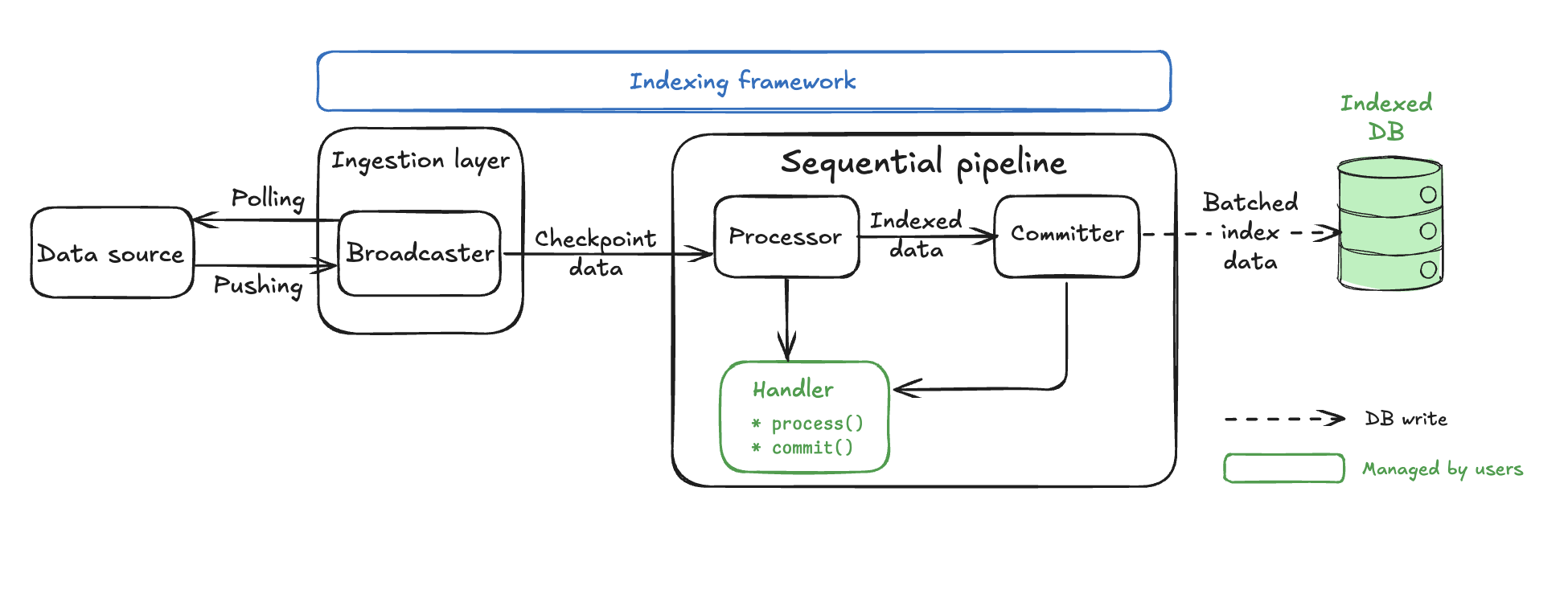
The Broadcaster and Processor components use identical backpressure mechanisms, adaptive parallel processing, and processor() implementations to the concurrent pipeline. The Processor component is described in detail in the Common pipeline components section.
The key difference is the dramatically simplified pipeline core with just a single Committer component that handles ordering, batching, and database commits. Concurrent pipelines, in contrast, have five separate components in addition to the Processor: Collector, Committer, CommitterWatermark, ReaderWatermark, and Pruner.
Sequential pipeline components
Sequential pipelines have one pipeline-specific component in addition to the shared Processor, the Committer.
Committer
The sequential Committer is the main component of the pipeline and your main customization point. At a high level, the Committer performs the following actions:
- Receives out-of-order processed data from the processor.
- Orders the data by checkpoint sequence.
- Batches multiple checkpoints together using your logic.
- Commits the batch to the database atomically.
To customize, your code uses two key functions that the committer calls:
batch(): Data merging logic.
fn batch(&self, batch: &mut Self::Batch, values: std::vec::IntoIter<Self::Value>);
commit(): Database write logic.
async fn commit<'a>(
    &self,
    batch: &Self::Batch,
    conn: &mut <Self::Store as Store>::Connection<'a>,
) -> anyhow::Result<usize>;
Sequential pipeline backpressure mechanisms
Sequential pipelines use two layers of backpressure to prevent memory overflow and ordering-related deadlocks:
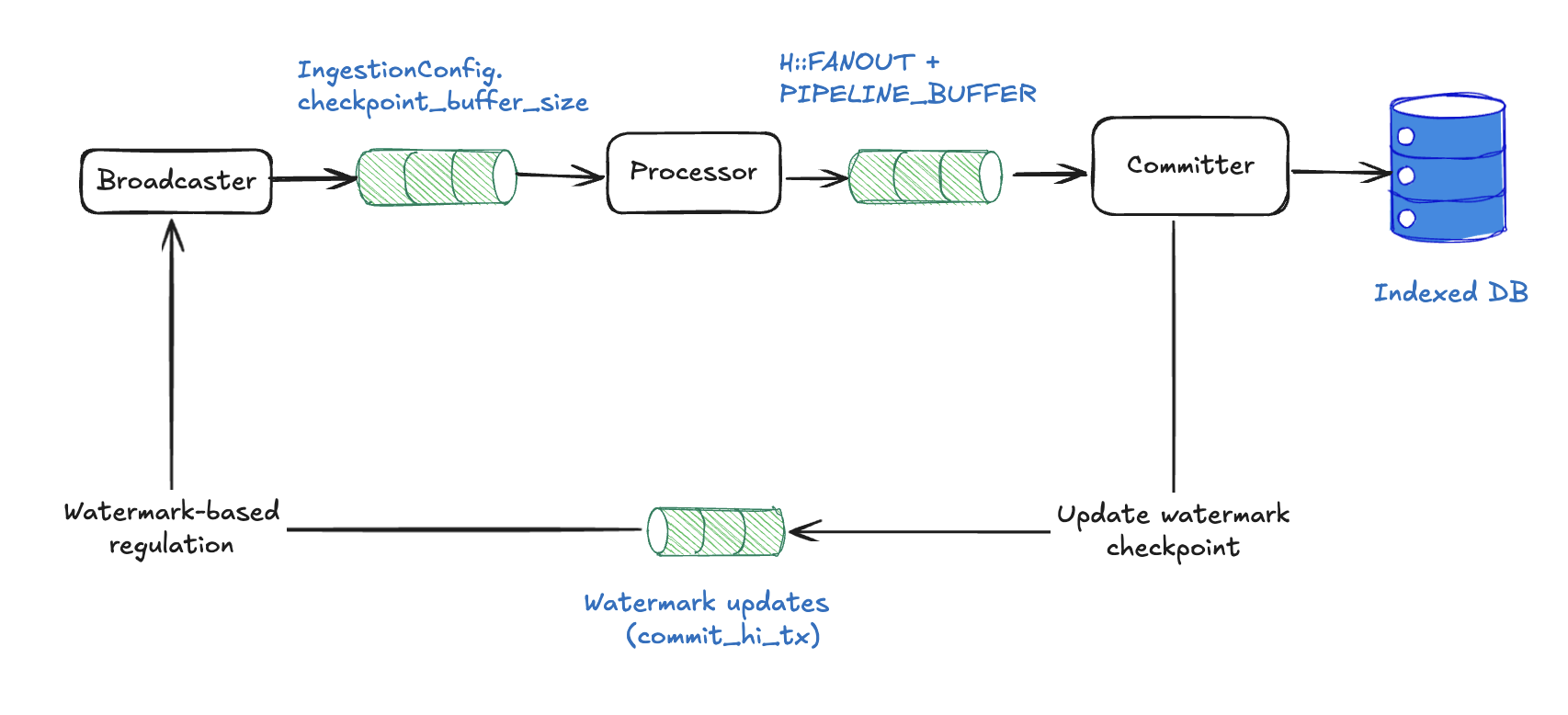
Channel-based backpressure
Sequential pipelines use the same bounded-channel backpressure model as concurrent pipelines:
- Broadcaster → Processor: bounded channel with
subscriber_channel_sizeslots. Send blocks when full, and the broadcaster's adaptive controller reads the channel'slen / capacityand cuts ingest concurrency as the subscriber falls behind. - Processor → Committer:
processor_channel_sizeslots (defaults tonum_cpus / 2). Drives the processor's adaptivefanoutcontroller.
Downstream pressure propagates backward: the committer slows, the processor-to-committer channel fills and collapses fanout to the minimum, the broadcaster-to-processor channel then fills and the broadcaster cuts ingest_concurrency. The committer itself holds an unbounded in-memory buffer of pending checkpoints so that out-of-order arrivals can still form a contiguous prefix to commit.
Performance tuning
Sequential pipelines have a more basic configuration but do require critical tuning parameters:
use sui_indexer_alt_framework::config::ConcurrencyConfig;

let config = SequentialConfig {
    committer: CommitterConfig {
        // Not applicable to sequential pipelines
        write_concurrency: 1,

        // Batch collection frequency in ms (default: 500)
        collect_interval_ms: 1000,
    },

    // Adaptive concurrency (default). Starts at 1 and scales up to num_cpus.
    fanout: None,
    // Or use fixed concurrency:
    // fanout: Some(ConcurrencyConfig::Fixed { value: 20 }),
    // Or customize adaptive bounds:
    // fanout: Some(ConcurrencyConfig::Adaptive {
    //     initial: 5,
    //     min: 1,
    //     max: 32,
    // }),

    min_eager_rows: None,
    max_batch_checkpoints: None,
    processor_channel_size: None, // defaults to num_cpus / 2

    // Per-pipeline overrides for the ingestion layer's defaults.
    ingestion: pipeline::IngestionConfig {
        // None falls back to the built-in default (max(num_cpus / 2, 4)).
        subscriber_channel_size: None,
    },
};
collect_interval_ms: Higher values allow more checkpoints per batch, improving efficiency.write_concurrency: Not applicable to sequential pipelines (always single-threaded writes).fanout: By default, processor concurrency is adaptive: it starts at 1 and scales up to the number of CPUs based on downstream channel pressure. The controller monitors the fill fraction of the processor-to-committer channel and adjusts concurrency using a dead band between 60% and 85% fill. You can override this with fixed concurrency (ConcurrencyConfig::Fixed) or customize the adaptive bounds (ConcurrencyConfig::Adaptive). The default max ofnum_cpusassumes your processor is CPU-bound. If your processor performs IO (for example, fetching data from an external service), you might want a higher max. The adaptive controller also exposes adead_bandparameter to override the fill-fraction thresholds, but the defaults should work well for most workloads.ingestion.subscriber_channel_size: Capacity of the bounded broadcaster-to-processor channel. Defaults tomax(num_cpus / 2, 4)whenNone. A pipeline that occasionally sees bursts can raise its own capacity, but note that a larger value makes this pipeline appear "less full" to the shared controller, so it triggers throttling later than its peers.processor_channel_size: Controls the size of the channel between the processor and the committer. Defaults tonum_cpus / 2. This channel is also the signal that drives the adaptive concurrency controller.
Concurrent pipeline architecture
Concurrent pipelines transform raw checkpoint data into indexed database records through a sophisticated multi-stage architecture designed for maximum throughput while maintaining data integrity. The watermark system covered in the watermark system section is fundamental to how every component coordinates.
Architecture overview
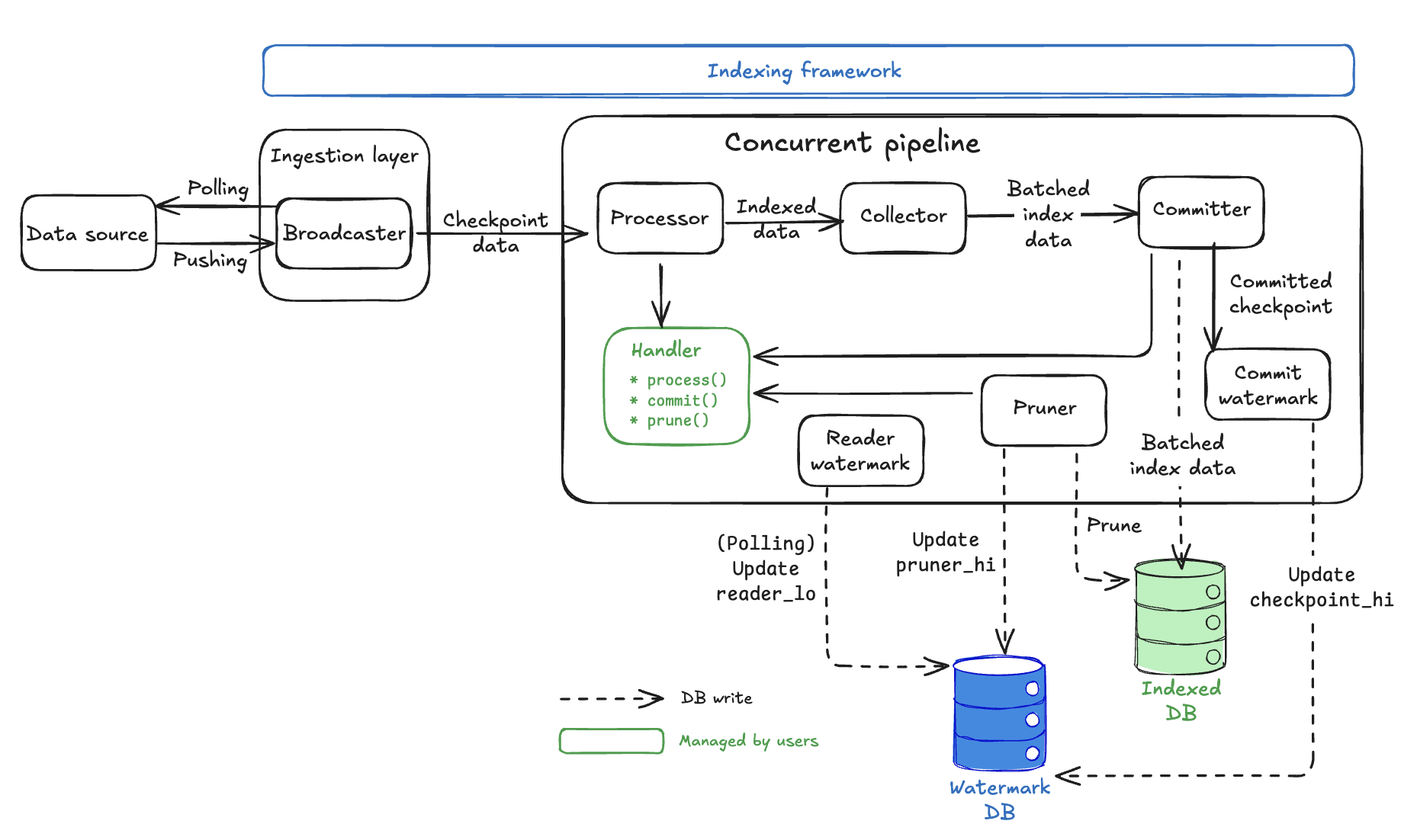
Key design principles:
- Watermark coordination: Safe out-of-order processing with consistency guarantees.
- Handler abstraction: Where your business logic plugs into the framework.
- Automatic storage management: Framework handles watermark tracking and data cleanup within the
Watermarkdatabase.
Concurrent pipeline components
Concurrent pipelines have five pipeline-specific components in addition to the shared Processor:
Collector
The primary responsibility of the Collector is to buffer processed data and create user-configurable batches for database writes.
The Collector receives out-of-order processed data from multiple Processor workers. It then buffers data until reaching optimal batch size (MIN_EAGER_ROWS) or until a timeout is met (to preserve forward progress for quiet pipelines).
/// If at least this many rows are pending, the committer will commit them eagerly.
const MIN_EAGER_ROWS: usize = 50;
The Collector combines data from multiple checkpoints into single database write batches and applies backpressure when too much data is pending (MAX_PENDING_ROWS).
/// If there are more than this many rows pending, the committer applies backpressure.
const MAX_PENDING_ROWS: usize = 5000;
Database writes are expensive; batching dramatically improves throughput by reducing the number of database round trips.
Committer
The Committer primarily writes batched data to the database using parallel connections with retry logic. It does this by receiving optimized batches from Collector, then spawns up parallel database writers to write_concurrency.
#[derive(Serialize, Deserialize, Debug, Clone)]
pub struct CommitterConfig {
    /// Number of concurrent writers per pipeline.
    pub write_concurrency: usize,

    /// The collector will check for pending data at least this often, in milliseconds.
    pub collect_interval_ms: u64,

    /// Watermark task will check for pending watermarks this often, in milliseconds.
    pub watermark_interval_ms: u64,

    /// Maximum random jitter to add to the watermark interval, in milliseconds.
    pub watermark_interval_jitter_ms: u64,
}
- Each writer calls your
Handler::commit()method with exponential backoff retry. - Reports successful writes to the
CommitterWatermarkcomponent.
The Committer tasks don't actually perform database operations. Rather, it calls your handler's commit() method. You must implement the actual database logic.
CommitterWatermark
The primary responsibility of the CommitterWatermark is to track which checkpoints are fully committed and update checkpoint_hi_inclusive in the Watermark table.
The CommitterWatermark receives WatermarkParts from successful Committer writes.
/// A representation of the proportion of a watermark.
#[derive(Debug, Clone)]
struct WatermarkPart {
    /// The watermark itself
    watermark: CommitterWatermark,
    /// The number of rows from this watermark that are in this part
    batch_rows: usize,
    /// The total number of rows from this watermark
    total_rows: usize,
}
The CommitterWatermark maintains an in-memory map of checkpoint completion status, advancing checkpoint_hi_inclusive only when there are no gaps in the sequence. Periodically, it writes the new checkpoint_hi_inclusive to the Watermark database.
This component enforces the critical rule that checkpoint_hi_inclusive can advance only when all data up to that point is committed with no gaps. See the watermark system for details on how this enables safe out-of-order processing.
By using polling, updates happen on a configurable interval (watermark_interval_ms) rather than immediately, balancing consistency with performance.
#[derive(Serialize, Deserialize, Debug, Clone)]
pub struct CommitterConfig {
    /// Number of concurrent writers per pipeline.
    pub write_concurrency: usize,

    /// The collector will check for pending data at least this often, in milliseconds.
    pub collect_interval_ms: u64,

    /// Watermark task will check for pending watermarks this often, in milliseconds.
    pub watermark_interval_ms: u64,

    /// Maximum random jitter to add to the watermark interval, in milliseconds.
    pub watermark_interval_jitter_ms: u64,
}
ReaderWatermark
The primary responsibility of the ReaderWatermark is to calculate and update reader_lo to maintain the retention policy and provide safe pruning boundaries.
The ReaderWatermark polls the Watermark database periodically (interval_ms) to check current checkpoint_hi_inclusive. It then calculates the new reader_lo = checkpoint_hi_inclusive - retention + 1 value and updates the reader_lo and pruner_timestamp in the Watermark database. This behavior provides the safety buffer that prevents premature pruning.
The reader_lo value represents the lowest checkpoint guaranteed to be available. This component ensures your retention policy is maintained. See the watermark system section for details on how reader_lo creates safe reading zones.
Pruner
The primary responsibility of the Pruner is to remove old data based on retention policies and to update pruner_hi.
The Pruner waits for the safety delay (delay_ms) after reader_lo updates.
#[derive(Serialize, Deserialize, Debug, Clone)]
pub struct PrunerConfig {
    /// How often the pruner should check whether there is any data to prune, in milliseconds.
    pub interval_ms: u64,

    /// How long to wait after the reader low watermark was set, until it is safe to prune up until
    /// this new watermark, in milliseconds.
    pub delay_ms: u64,

    /// How much data to keep, this is measured in checkpoints.
    pub retention: u64,

    /// The maximum range to try and prune in one request, measured in checkpoints.
    pub max_chunk_size: u64,

    /// The max number of tasks to run in parallel for pruning.
    pub prune_concurrency: u64,
}
The Pruner then calculates which checkpoints can be safely deleted and spawns up to prune_concurrency parallel cleanup tasks.
#[derive(Serialize, Deserialize, Debug, Clone)]
pub struct PrunerConfig {
    /// How often the pruner should check whether there is any data to prune, in milliseconds.
    pub interval_ms: u64,

    /// How long to wait after the reader low watermark was set, until it is safe to prune up until
    /// this new watermark, in milliseconds.
    pub delay_ms: u64,

    /// How much data to keep, this is measured in checkpoints.
    pub retention: u64,

    /// The maximum range to try and prune in one request, measured in checkpoints.
    pub max_chunk_size: u64,

    /// The max number of tasks to run in parallel for pruning.
    pub prune_concurrency: u64,
}
Each task calls your Handler::prune() method for specific checkpoint ranges and updates pruner_hi as cleanup completes.
The Pruner tasks don't actually delete data. Rather, they call your handler's prune() method. You must implement the actual cleanup logic.
The Pruner operates in the range between the current pruner_hi and the safe boundary determined by reader_lo, ensuring readers are never affected. See the watermark system for details on the three-watermark coordination.
Handler abstraction
The Handler is where you implement your indexing business logic. The framework calls three key methods:
trait Processor {
    // Called by Processor workers
    async fn process(&self, checkpoint: &Arc<Checkpoint>) -> anyhow::Result<Vec<Self::Value>>;
}

trait Handler {
    // Called by Committer workers
    async fn commit(&[Self::Value], &mut Connection) -> Result<usize>;

    // Called by Pruner workers
    async fn prune(&self, from: u64, to: u64, &mut Connection) -> Result<usize>;
}
The framework components (Committer, Pruner) are orchestrators that manage concurrency, retries, and watermark coordination. The actual database operations happen in your Handler methods.
Watermark table management
The Watermark table manages all watermark coordination. It is critical for recovery, as the framework reads this table to resume from the correct checkpoint.
The framework automatically creates and manages a Watermark table in your database when you first run your indexer. The table might have only one row per pipeline, allowing multiple indexers to share the same database.
Watermark schema:
// @generated automatically by Diesel CLI.

diesel::table! {
    watermarks (pipeline) {
        pipeline -> Text,
        epoch_hi_inclusive -> Int8,
        checkpoint_hi_inclusive -> Int8,
        tx_hi -> Int8,
        timestamp_ms_hi_inclusive -> Int8,
        reader_lo -> Int8,
        pruner_timestamp -> Timestamp,
        pruner_hi -> Int8,
        chain_id -> Nullable<Bytea>,
    }
}
Concurrent pipeline backpressure mechanisms
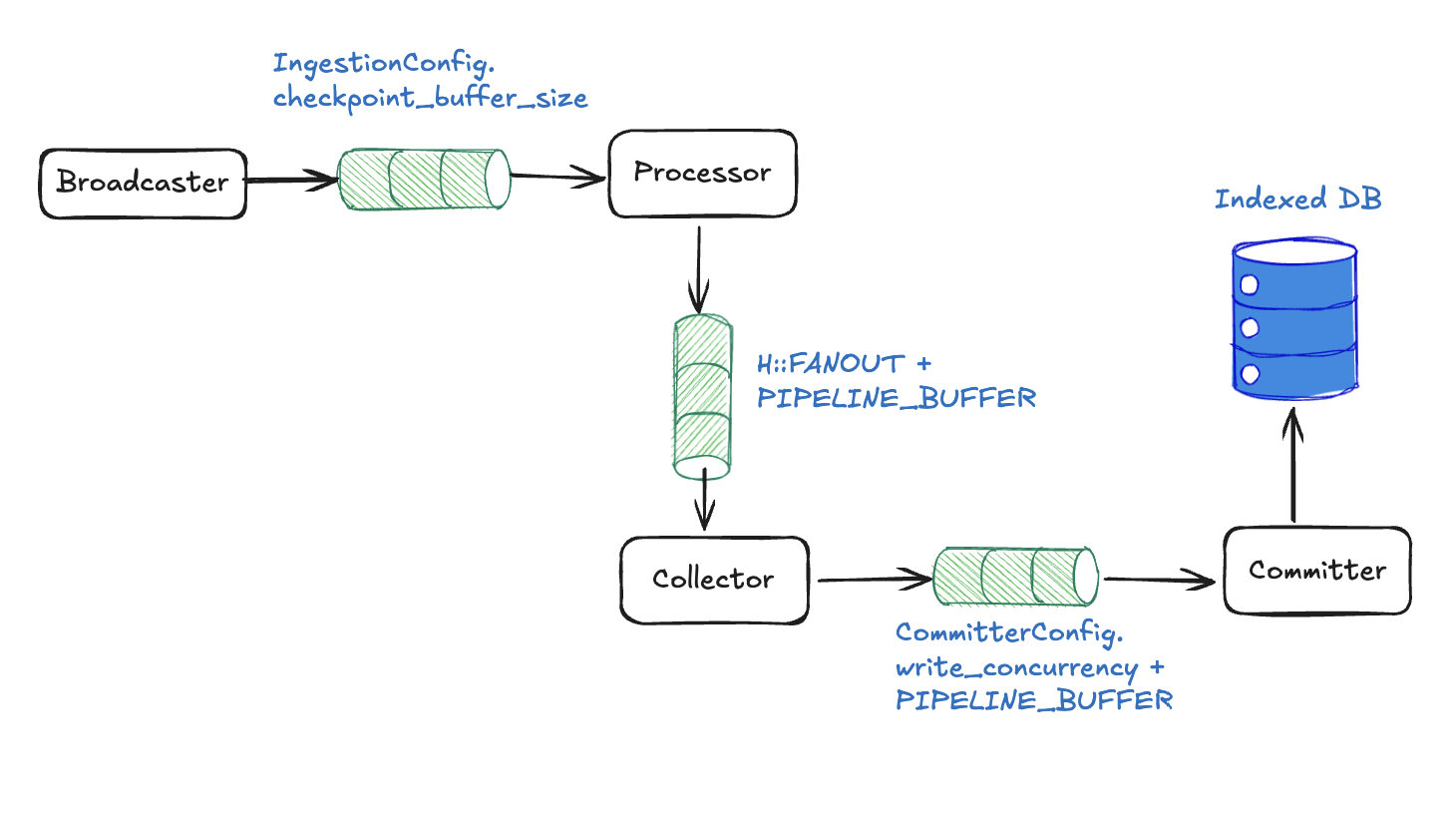
With the component architecture detailed, you can examine how the pipeline prevents memory overflow through cascading backpressure using inter-component channels.
Channel-level blocking with fixed sizes
Each channel has a fixed buffer size that automatically blocks when full:
Broadcaster to Processor: subscriber_channel_size slots → Broadcaster blocks, upstream pressure.
/// Per-pipeline ingestion settings.
#[derive(Serialize, Deserialize, Debug, Clone, Default)]
pub struct IngestionConfig {
    /// Capacity of this pipeline's bounded subscriber channel. If `None`, the built-in default
    /// is used (see [`IngestionConfig::subscriber_channel_size`]).
    pub subscriber_channel_size: Option<usize>,
}
Processor to Collector: processor_channel_size slots (defaults to num_cpus / 2) → All workers block on send().
let (processor_tx, collector_rx) = mpsc::channel(processor_channel_size);
Collector to Committer: collector_channel_size slots (defaults to num_cpus / 2) → Collector stops accepting.
let (collector_tx, committer_rx) = mpsc::channel(collector_channel_size);
When any channel fills, pressure automatically propagates backward through the entire pipeline.
Component-level blocking
At the component level, the Collector respects memory limits and stops accepting when pending_rows ≥ MAX_PENDING_ROWS.
Some(mut indexed) = rx.recv(), if pending_rows < max_pending_rows => {
    let reader_lo = reader_lo_atomic.load(Ordering::Relaxed);

    metrics
        .collector_reader_lo
        .with_label_values(&[H::NAME])
        .set(reader_lo as i64);

    let mut recv_cps = 0usize;
    let mut recv_rows = 0usize;
    loop {
        if indexed.checkpoint() < reader_lo {
            indexed.values.clear();
            metrics
                .total_collector_skipped_checkpoints
                .with_label_values(&[H::NAME])
                .inc();
        }

        recv_cps += 1;
        recv_rows += indexed.len();
        pending_rows += indexed.len();
        pending.insert(indexed.checkpoint(), indexed.into());

        if pending_rows >= max_pending_rows {
            break;
        }

        match rx.try_recv() {
            Ok(next) => indexed = next,
            Err(_) => break,
        }
    }

    metrics
        .total_collector_rows_received
        .with_label_values(&[H::NAME])
        .inc_by(recv_rows as u64);
    metrics
        .total_collector_checkpoints_received
        .with_label_values(&[H::NAME])
        .inc_by(recv_cps as u64);

    if pending_rows < min_eager_rows {
        continue;
    }
}
Database connection limits are also in place. The Committer blocks when all connections are busy.
Backpressure in practice
Basic example: Slow database scenario
- Initial state: Your indexer is processing 100 checkpoints per second.
- Bottleneck appears: Database becomes slow (because of high load, maintenance, or similar) and can now only handle 50 commits per second.
- Backpressure cascade:
Committerchannel fills up (cannot commit fast enough).Collectorstops sending toCommitter(channel full).Processorchannel fills; its adaptivefanoutcontroller cuts processor concurrency toward the minimum.Broadcastersees the subscriber channel filling and its adaptiveingest_concurrencycontroller cuts fetch concurrency toward the minimum. If the channel reaches capacity, ingest tasks block onsendand checkpoint ingestion pauses until the channel drains.
- End result:
- Indexer automatically slows to 50 checkpoints per second, matching database capacity.
- Memory stays bounded, no runaway growth.
- No data loss as everything just processes slower.
- System is stable at the bottleneck pace.
- Recovery: When database speeds up, channels start draining and indexer automatically returns to full speed.
What happens:
- Slower checkpoint progress in logs and metrics.
- Stable memory usage (no growth).
- System remains responsive, just at reduced throughput.
Performance tuning
The following sections detail the configuration settings you can implement for optimal performance.
Concurrent pipeline Handler constants
Handler constants are the most direct way to tune pipeline behavior. These are implemented as associated constants in your Handler trait implementation and serve as per-handler defaults.
impl concurrent::Handler for MyHandler {
    type Store = Db;

    // Minimum rows to trigger eager commit for committer (default: 50)
    const MIN_EAGER_ROWS: usize = 100;

    // Backpressure threshold on collector (default: 5000)
    const MAX_PENDING_ROWS: usize = 10000;

    // Maximum watermarks per batch (default: 10,000)
    const MAX_WATERMARK_UPDATES: usize = 5000;
}
These constants can also be overridden at runtime through ConcurrentConfig, without recompiling. Config values take precedence over trait constants when present.
use sui_indexer_alt_framework::config::ConcurrencyConfig;

let config = ConcurrentConfig {
    committer: committer_config,
    pruner: Some(pruner_config),
    // Adaptive concurrency (default). Starts at 1 and scales up to num_cpus.
    fanout: None,
    // Or use fixed concurrency:
    // fanout: Some(ConcurrencyConfig::Fixed { value: 20 }),
    // Or customize adaptive bounds:
    // fanout: Some(ConcurrencyConfig::Adaptive {
    //     initial: 5,
    //     min: 1,
    //     max: 32,
    // }),
    min_eager_rows: Some(100),
    max_pending_rows: Some(10000),
    max_watermark_updates: Some(5000),
    processor_channel_size: None, // defaults to num_cpus / 2
    collector_channel_size: None, // defaults to num_cpus / 2
    committer_channel_size: None, // defaults to num_cpus

    // Per-pipeline overrides for the ingestion layer's defaults.
    ingestion: pipeline::IngestionConfig {
        // None falls back to the built-in default (max(num_cpus / 2, 4)).
        subscriber_channel_size: None,
    },
};
Tuning guidelines:
fanout: By default, processor concurrency is adaptive: it starts at 1 and scales up to the number of CPUs based on downstream channel pressure. The controller monitors the fill fraction of the processor-to-collector channel and adjusts concurrency using a dead band between 60% and 85% fill. You can override this with fixed concurrency (ConcurrencyConfig::Fixed) or customize the adaptive bounds (ConcurrencyConfig::Adaptive). The default max ofnum_cpusassumes your processor is CPU-bound. If your processor performs IO (for example, fetching data from an external service), you might want a higher max. The adaptive controller also exposes adead_bandparameter to override the fill-fraction thresholds, but the defaults should work well for most workloads.processor_channel_size: Controls the size of the channel between the processor and the collector. Defaults tonum_cpus / 2. This channel is also the signal that drives the adaptive concurrency controller.collector_channel_size: Controls the size of the channel between the collector and the committer. Defaults tonum_cpus / 2. Increase if the committer drains batches faster than the collector can supply them.committer_channel_size: Controls the size of the channel between the committer and the watermark updater. Defaults tonum_cpus. Rarely needs tuning.ingestion.subscriber_channel_size: Capacity of the bounded broadcaster-to-processor channel. Defaults tomax(num_cpus / 2, 4)whenNone. Raise it for a pipeline that needs more headroom against ingestion bursts. A larger value means this pipeline triggers the adaptive ingest controller's throttling later than its peers.MIN_EAGER_ROWS: Lower values reduce data commit latency (individual data appears in database sooner), higher values improve overall throughput (more efficient larger batches).MAX_PENDING_ROWS: Controls how much data can accumulate when the committer falls behind. Higher values provide more buffer space but use more memory during bottlenecks.MAX_WATERMARK_UPDATES: Lower for sparse pipelines (rare events), keep default for dense pipelines.
CommitterConfig optimization
The CommitterConfig controls how data flows from collection to database commits:
let config = ConcurrentConfig {
    committer: CommitterConfig {
        // Number of parallel database writers (default: 5)
        write_concurrency: 10,

        // How often collector checks for batches in ms (default: 500)
        collect_interval_ms: 250,

        // How often watermarks are updated in ms (default: 500)
        watermark_interval_ms: 1000,

        // Maximum random jitter added to watermark interval in ms (default: 0)
        watermark_interval_jitter_ms: 100,
    },
    pruner: Some(pruner_config),
    ..Default::default()
};
Tuning guidelines:
write_concurrency: Higher values result in faster throughput but more database connections;ensure total_pipelines × write_concurrency < db_connection_pool_size.collect_interval_ms: Lower values reduce latency but increase CPU overhead.watermark_interval_ms: Controls how often watermarks are updated. Higher values reduce database contention from frequent watermark writes but make the indexer slower to respond to pipeline progress.
PrunerConfig settings
Configure data retention and pruning performance:
let pruner_config = PrunerConfig {
    // Check interval for pruning opportunities in ms (default: 300,000 = 5 min)
    interval_ms: 600_000, // 10 minutes for less frequent checks

    // Safety delay after reader watermark update in ms (default: 120,000 = 2 min)
    delay_ms: 300_000, // 5 minutes for conservative pruning

    // How many checkpoints to retain (default: 4,000,000)
    retention: 10_000_000, // Keep more data for analytics

    // Max checkpoints to prune per operation (default: 2,000)
    max_chunk_size: 5_000, // Larger chunks for faster pruning

    // Parallel pruning tasks (default: 1)
    prune_concurrency: 3, // More parallelism for faster pruning
};
Tuning guidelines:
retention: Balance storage costs versus data availability needs.max_chunk_size: Larger values faster pruning, but longer database transactions.prune_concurrency: Do not exceed database connection limits.delay_ms: Increase for safety, decrease for aggressive storage optimization.